








A Local AI Ran a Bearing-Load Engineering Workflow on a Desktop PC — Here Is What the Logs Actually Show
Few weeks ago I had exhausted my available ChatGPT usage while I was still in the middle of real work. The interruption felt surprisingly disturbing: it felt something like your health, you dont think about it until something goes wrong.
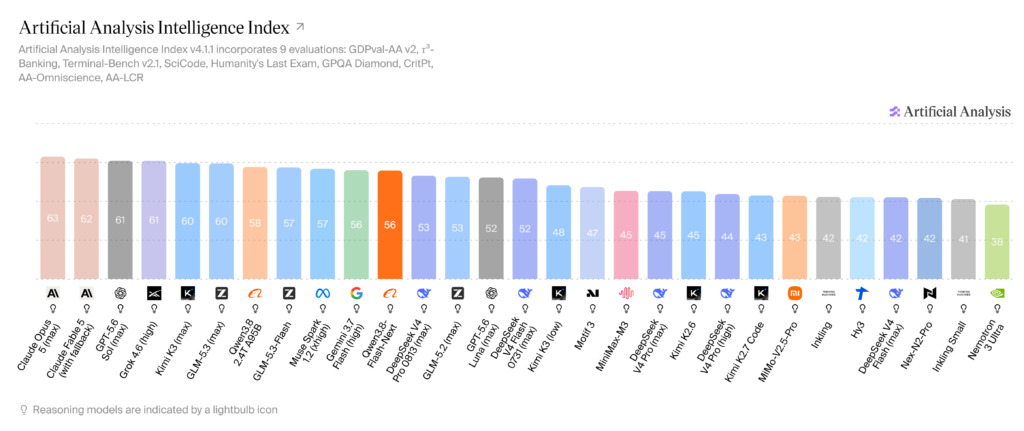
That experience made me feel quiet vulnerable and I thought of the local AI. I heard of course the local AI models became quite capable recently, but I thought I need quite some hardware to get anything descent and it turned out to be false. A quick review of the models shown in the image above reveals the current situation with few open weight models that can be used on your home set up and give you, at least according to benchmarks, performance that is not much far worse than the frontier models. The model that is especially interesting, is Qwen3.8 Flash Next with 56 scores according to this particular benchmark, and sits between GPT5.6 Sol (61) and GPT5.6 Luna (52). This model was released in August and can be run locally with relatively cheap machines, you don’t need to have excessively large amount of vRAM, although you need more RAM. Nowadays, RAM is much cheaper than vRAM, so this is an advantage. Long story short, I tried it on my home setup, which is a prosumer, but not AI dedicated desktop.
I decided to test Qwen3.8-Flash-Next through a Hermes agent. I used the TriboNet Bearing Internal Load Distribution and Stiffness Calculator for a simple but realistic task:
- Open the TriboNet bearing internal-load calculator, set the radial load to 9,000 N and the ball count to 10, retain the calculator’s default clearance and contact stiffness, and report the maximum rolling-element load.
The model completed the browser task and returned the correct result.
What this local AI engineering workflow showed
- The local model completed a multi-step browser workflow and extracted the correct maximum rolling-element load on my relatively non-AI machine
- The seven-turn agent run took about 8.5 minutes on the test workstation.
- Prompt caching reduced the newly computed token volume to 7,678 tokens, despite much larger cumulative API-style traffic.
- The numerical result was correct, but one part of the model’s physical explanation still needed human correction.
The local setup
The agent setup:
- Model: Qwen3.8-Flash-Next
- Quantization: UD-Q4_K_XL GGUF
- Model file: 78.95 GB, or about 73.5 GiB
- Architecture: 125B total parameters, 6B activated parameters, plus 51B n-gram embedding parameters
- Context: 131,072 tokens in this local run
- CPU: AMD Ryzen 9 9950X, 16 cores / 32 threads
- GPU: NVIDIA GeForce RTX 5060 Ti, 16 GB VRAM
- Installed system memory: approximately 128 GB (125.5 GiB reported by Windows)
- Inference engine: llama.cpp
- Runtime arrangement: one inference slot; the launcher requested 99 GPU layers while explicitly assigning the MoE expert layers to CPU
This matters because “125B model on a 16 GB GPU” is an incomplete description. The workload was split across CPU, GPU and a 128 GB host-memory pool.
The engineering task and result
The calculator inputs were:

- Radial load,
Fr= 9,000 N - Ball count,
Z= 10 - Diametral clearance,
Pd= 0.015 mm - Contact stiffness,
Kn= 373,500 N/mm^1.5
The local agent extracted these calculator results:
- Maximum element load: 4,142.9 N
- Radial displacement: 0.0572367 mm
- Load-zone half-angle: 82.471°
- Tangent stiffness: 280,210 N/mm
- Equilibrium residual: 1.008 × 10^-9 N
How long did the local agent take?
The calculator workflow required seven model API-style turns inside Hermes.
Measured from the local llama.cpp logs:
- End-to-end model activity: approximately 510 seconds, or 8.5 minutes
- Prompt evaluation: 73.35 seconds
- Token generation: 436.16 seconds
- Aggregate prompt-evaluation speed: 55.5 new tokens/s
- Aggregate decoding speed: 8.27 output tokens/s
- Overall generated-token rate including prompt evaluation: 7.08 tokens/s
The final browser and extraction tools were fast. Most elapsed time was model inference.
How many tokens did it use?
Token accounting for an agent needs more than one number.
Across the seven turns, the logs recorded:
- Total input tokens presented across requests: 460,585
- Cached input tokens reused: 456,516
- Newly evaluated input tokens: 4,069
- Generated output tokens: 3,609
- Newly computed input plus output tokens: 7,678
Therefore, saying “the task used 464,194 tokens” is technically true as summed API traffic, but misleading as a compute claim. Almost all of the repeated prompt context came from the local prompt cache. The new model computation was closer to 7,678 tokens.
This task benefited from a warm conversational cache. A cold run with the same repeated context would be dramatically slower.
What would the same token trace cost through an OpenAI API?
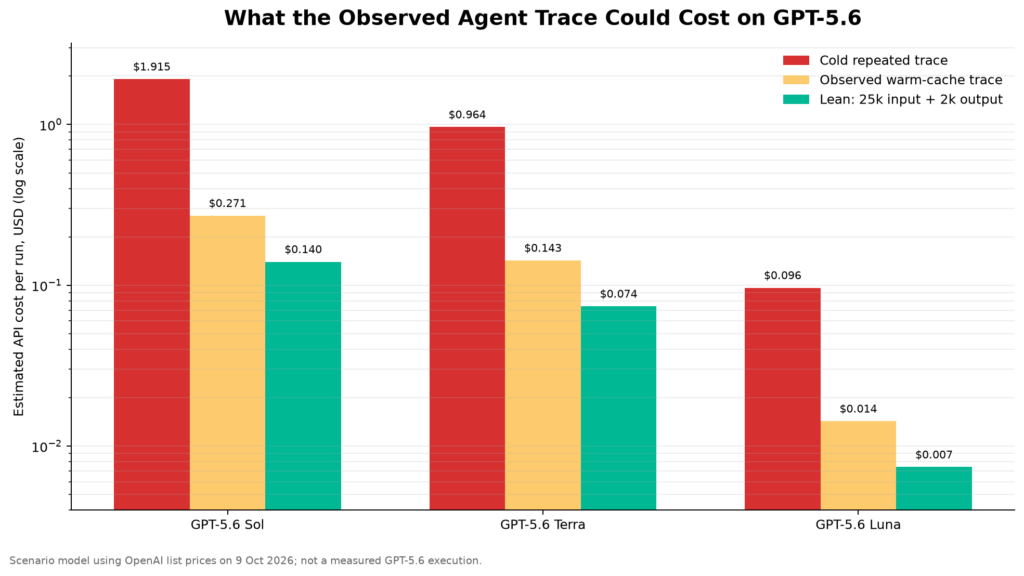
The comparison below uses OpenAI’s published GPT-5.6 token prices on 9 October 2026.
Scenario 1 — same seven-request trace, no cache discount
Assume all 460,585 input tokens are billed as ordinary input and 3,609 as output:
- GPT-5.6 Sol: $1.915 per run
- GPT-5.6 Terra: $0.964 per run
- GPT-5.6 Luna: $0.096 per run
Scenario 2 — same trace with the observed warm-cache pattern
Assume 4,069 uncached input tokens, 456,516 cached input tokens and 3,609 output tokens:
- GPT-5.6 Sol: $0.271 per run
- GPT-5.6 Terra: $0.143 per run
- GPT-5.6 Luna: $0.0143 per run
Scenario 3 — a leaner cloud-agent implementation
Assume a compact workflow with 25,000 uncached input tokens and 2,000 output tokens:

- GPT-5.6 Sol: $0.140 per run
- GPT-5.6 Terra: $0.074 per run
- GPT-5.6 Luna: $0.0074 per run
What did the local run cost?
The marginal electricity cost was small. If the complete system averaged 300 W during the 8.5-minute task, it consumed about 0.042 kWh.
At $0.15/kWh, that is approximately $0.0064 of electricity.
Hardware amortization adds to the picture. For a hypothetical $2,000 workstation depreciated over three years, the allocated hardware cost for this run would be approximately:

- $0.011 if the machine is productively used 24 hours per day
- $0.032 at 8 productive hours per day
- $0.129 at 2 productive hours per day
Adding electricity gives a rough all-in range of $0.017 to $0.135 per run, depending mainly on utilization.
For an already-owned machine, the relevant marginal cost is much closer to the electricity figure. For a machine purchased specifically for inference, utilization determines whether local deployment makes economic sense.
How Qwen compares with frontier AI models
The featured chart provides a broader comparison than open-weight models alone. In the Artificial Analysis Intelligence Index v4.1.1 snapshot, Qwen3.8-Flash-Next scores 56 and appears alongside proprietary frontier systems from Anthropic, OpenAI, Google and xAI, as well as other open and closed models.
That result is encouraging, but it should not be treated as a permanent league table. Model rankings change as providers update systems and as benchmark methods evolve. The bearing-load experiment in this article tests something narrower and more practical: whether the model can operate tools, preserve inputs, recover outputs and support a result that survives an independent calculation.
How the model compares on an agentic-work benchmark
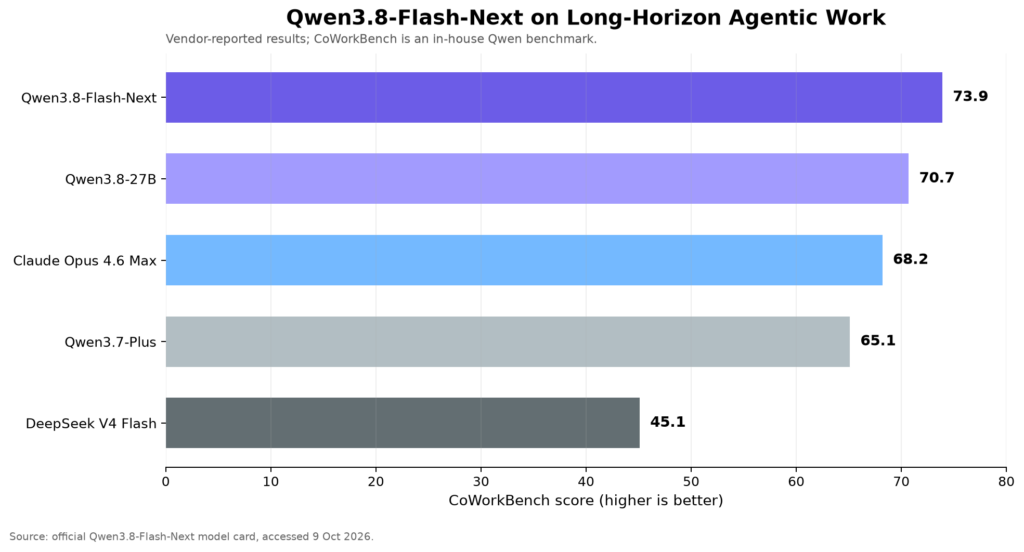
Qwen’s official model card reports a 73.9 CoWorkBench score for Qwen3.8-Flash-Next, compared with 70.7 for Qwen3.8-27B, 68.2 for Claude Opus 4.6 Max, 65.1 for Qwen3.7-Plus and 45.1 for DeepSeek-V4-Flash-0731.
This should be interpreted carefully. CoWorkBench is described by Qwen as an in-house benchmark for long-horizon office and productivity tasks. The chart in this article reproduces vendor-reported results; it is not an independent benchmark reproduction.
Still, the real bearing-calculator test supports the broader claim that the model is capable of multi-step agentic work. It navigated a nontrivial browser-access path, interacted with a technical calculator and extracted correct engineering values.
Practical conclusion
This experiment showed that a local AI model can perform useful agentic engineering work on a relatively regular machine, with ‘only’ 16 GB of VRAM and 128 GB of RAM. However, it must be noted that despite the model running, it cannot run few agents on this setup and it takes quite some time when task changes as the cache is changing.

For this bearing calculation, the local Qwen agent produced the correct result, but it took about 8.5 minutes on a desktop. It is a realistic picture of the technology: capable, private and inexpensive at the margin, but relatively slow. For a related view of how language models can assist domain experts, see the TriboNet webinar summary TriboAI: Making Language Models Read Friction Curves.
Sources and methodology
- TriboNet, Bearing Internal Load Distribution and Stiffness Calculator
- Qwen, Qwen3.8-Flash-Next model card and benchmark table
- Qwen, Qwen3.8-Flash-Next technical report
- OpenAI, API pricing
- T. A. Harris and M. N. Kotzalas, Advanced Concepts of Bearing Technology: Rolling Bearing Analysis, 5th ed., CRC Press, 2006, Chapters 7–8.
Measurement note: Qwen timings and token counts were reconstructed from the local Hermes, llama.cpp and model-server logs for the calculator run. OpenAI figures are scenario calculations based on the observed Qwen token trace, not a controlled side-by-side cloud execution. Electricity and amortization figures are assumptions and are labeled accordingly.
0 Comment